Webhook Admin Panel
Django-CFG includes a built-in webhook administration panel in the payments app that automatically displays active ngrok URLs and webhook status.
Overview
The Webhook Admin Panel provides:
✅ Real-time Ngrok Status - See if tunnel is active ✅ Automatic URL Display - Current public ngrok URL ✅ Per-Provider Webhook URLs - URLs for Stripe, NowPayments, Telegram, etc. ✅ Webhook Events Log - History of all received webhooks ✅ Testing Tools - Test webhook endpoints directly
Enabling the Panel
1. Enable Payments App
# config.py
from django_cfg import DjangoConfig, NgrokConfig

class MyConfig(DjangoConfig):
    project_name: str = "My Project"

    # Enable payments app (includes webhook panel)
    enable_payments: bool = True

    # Enable ngrok
    ngrok: NgrokConfig = NgrokConfig(enabled=True)

config = MyConfig()
2. Run Migrations
# Create payments app tables
python manage.py migrate
3. Start Server with Ngrok
# Start Django with ngrok tunnel
python manage.py runserver_ngrok

# Output:
# ✅ Ngrok tunnel ready: https://abc123.ngrok.io
# Django development server is running at http://127.0.0.1:8000/
# Public URL: https://abc123.ngrok.io
4. Access Admin Panel
Open your browser to:
http://localhost:8000/admin/payments/webhook/
Login with your admin credentials.
Panel Features
The Webhook Dashboard provides comprehensive webhook monitoring and testing capabilities.
1. Recent Webhook Events
Real-time event log with filtering:
Features:
- 📋 Event List - All received webhook events (e.g., payment.created)
- 🎯 Smart Filters - Filter by event type and status
- 🔍 Event Details - View/retry individual events
- 🧹 Clear All - Clear event history
- ✅ Status Indicators - Green (success), Red (failed)
Event Display:
payment.created [success]
Invalid Date
[View] [Retry]

payment.created [failed]
Invalid Date
[View] [Retry]
2. Ngrok Tunnel Status
Live ngrok tunnel information:
Displays:
- 🟢 Status Indicator - Visual "Active" status with green dot
- 🌐 Public URL -
https://eed65489ae77.ngrok-free.appwith copy button - 🔗 Webhook URL -
https://eed65489ae77.ngrok-free.app/apiwith copy button - 🔄 Refresh - Update tunnel status
- 🚀 Open Tunnel - Open ngrok web interface
Copy URLs: Each URL has a copy button (📋) for quick clipboard access.
3. Webhook Stats
Real-time webhook statistics:
| Metric | Value | Color |
|---|---|---|
| Total Events | 6 | White |
| Successful | 5 | Green |
| Failed | 0 | Red |
| Success Rate | undefined% | White |
Live Updates: Stats update automatically as new webhooks are received.
4. Test Webhook
Built-in webhook testing tool:
Fields:
- Webhook URL - Enter target webhook endpoint (pre-filled with ngrok URL)
- Event Type - Select from dropdown (e.g., payment.created, payment.updated)
- Send Test Webhook - Button to trigger test request
Example Usage:
Webhook URL: https://your-site.com/webhook
Event Type: [Select event type...]
[Send Test Webhook]
5. Quick Actions
Convenient action buttons:
- 🔁 Retry Failed Events (Orange) - Automatically retry all failed webhook events
- 🏠 Back to Dashboard (Blue) - Return to main payments dashboard
Using the Panel
Viewing Webhook URLs
# The panel automatically shows webhook URLs for all providers

# Access panel via Django admin:
# http://localhost:8000/admin/payments/webhook/

# The panel displays:
# - Current ngrok tunnel URL
# - Webhook URLs for each provider
# - Status of each webhook endpoint
Copying Webhook URLs
Click the "Copy" button next to any webhook URL to copy it to clipboard:
Stripe Webhook URL:
https://abc123.ngrok.io/api/webhooks/stripe/
[Copy] [Test]
Testing Webhooks
Use the "Test" button to send a test webhook to your endpoint:
# Click "Test" button
# Panel sends test POST request to webhook endpoint
# Displays response status and body

Test Request:
POST https://abc123.ngrok.io/api/webhooks/stripe/
Content-Type: application/json

{"event": "test", "timestamp": "2025-10-01T14:35:00Z"}

Response:
Status: 200 OK
Body: {"status": "success"}
API Reference
The webhook panel provides an API for programmatic access.
Get Webhook URLs
# In your Django code:
from django_cfg.apps.payments.services.integrations import get_webhook_url_for_provider

# Get webhook URL for specific provider
stripe_webhook = get_webhook_url_for_provider("stripe")
# "https://abc123.ngrok.io/api/webhooks/stripe/"

nowpayments_webhook = get_webhook_url_for_provider("nowpayments")
# "https://abc123.ngrok.io/api/webhooks/nowpayments/"

telegram_webhook = get_webhook_url_for_provider("telegram")
# "https://abc123.ngrok.io/api/webhooks/telegram/"
Check Ngrok Status
from django_cfg.modules.django_ngrok import is_tunnel_active, get_tunnel_url

# Check if tunnel is active
if is_tunnel_active():
    print(f"✅ Tunnel active: {get_tunnel_url()}")
else:
    print("⚠️ Tunnel not active")
List All Webhook URLs
from django_cfg.apps.payments.services.integrations.ngrok_service import get_all_webhook_urls

# Get dictionary of all webhook URLs
webhook_urls = get_all_webhook_urls()

# Returns:
# {
#     "stripe": "https://abc123.ngrok.io/api/webhooks/stripe/",
#     "nowpayments": "https://abc123.ngrok.io/api/webhooks/nowpayments/",
#     "telegram": "https://abc123.ngrok.io/api/webhooks/telegram/",
# }

for provider, url in webhook_urls.items():
    print(f"{provider}: {url}")
Built-in Integration
The payments app automatically integrates with ngrok:
Automatic URL Updates
# payments/services/integrations/ngrok_service.py (built-in!)

def get_webhook_url_for_provider(provider: str) -> str:
    """Automatically gets webhook URL for provider."""
    from django_cfg.modules.django_ngrok import get_webhook_url
    return get_webhook_url(f"/api/webhooks/{provider}/")

# Usage in payments code:
from django_cfg.apps.payments.services.integrations import get_webhook_url_for_provider

# Automatically correct URL!
nowpayments_webhook = get_webhook_url_for_provider("nowpayments")
# "https://abc123.ngrok.io/api/webhooks/nowpayments/"
Webhook Event Logging
All webhook events are automatically logged in the admin panel:
# Built-in webhook logging
from django_cfg.apps.payments.models import WebhookEvent

# Automatically created for each webhook
event = WebhookEvent.objects.create(
    provider="stripe",
    event_type="payment_intent.succeeded",
    payload=request.body,
    status="success",
    response_time_ms=45
)

# View all events in admin panel
Configuration
Custom Webhook Paths
# config.py
from django_cfg import NgrokConfig

ngrok: NgrokConfig = NgrokConfig(
    enabled=True,
    webhook_path="/webhooks/"  # Custom base path
)

# Webhook URLs will be:
# https://abc123.ngrok.io/webhooks/stripe/
# https://abc123.ngrok.io/webhooks/nowpayments/
# https://abc123.ngrok.io/webhooks/telegram/
Custom Provider Paths
# urls.py
from django.urls import path
from . import webhook_views

urlpatterns = [
    # Custom webhook paths
    path('webhooks/stripe/', webhook_views.stripe_webhook),
    path('webhooks/crypto/', webhook_views.nowpayments_webhook),  # Custom!
    path('webhooks/bot/', webhook_views.telegram_webhook),  # Custom!
]

# Panel will show:
# - Stripe: https://abc123.ngrok.io/webhooks/stripe/
# - NowPayments: https://abc123.ngrok.io/webhooks/crypto/
# - Telegram: https://abc123.ngrok.io/webhooks/bot/
Development Workflow
Complete Workflow Example
# 1. Configure payments app and ngrok
class MyConfig(DjangoConfig):
    enable_payments: bool = True
    ngrok: NgrokConfig = NgrokConfig(enabled=True)

# 2. Start server
# $ python manage.py runserver_ngrok
# ✅ Ngrok tunnel ready: https://abc123.ngrok.io

# 3. Open webhook admin panel
# http://localhost:8000/admin/payments/webhook/

# 4. Copy webhook URLs from panel
# Stripe: https://abc123.ngrok.io/api/webhooks/stripe/
# NowPayments: https://abc123.ngrok.io/api/webhooks/nowpayments/

# 5. Configure webhooks in external services
# - Stripe Dashboard: Set webhook URL
# - NowPayments API: Set IPN callback URL
# - Telegram: Set bot webhook

# 6. Test webhooks locally
# - Send test payments
# - View webhook events in admin panel
# - Debug issues in real-time

# 7. Monitor webhook events
# - Check webhook events log
# - View response times
# - Debug failed webhooks
Panel Screenshots
Webhook Dashboard Interface
The Webhook Dashboard provides a modern, user-friendly interface for webhook monitoring and testing:
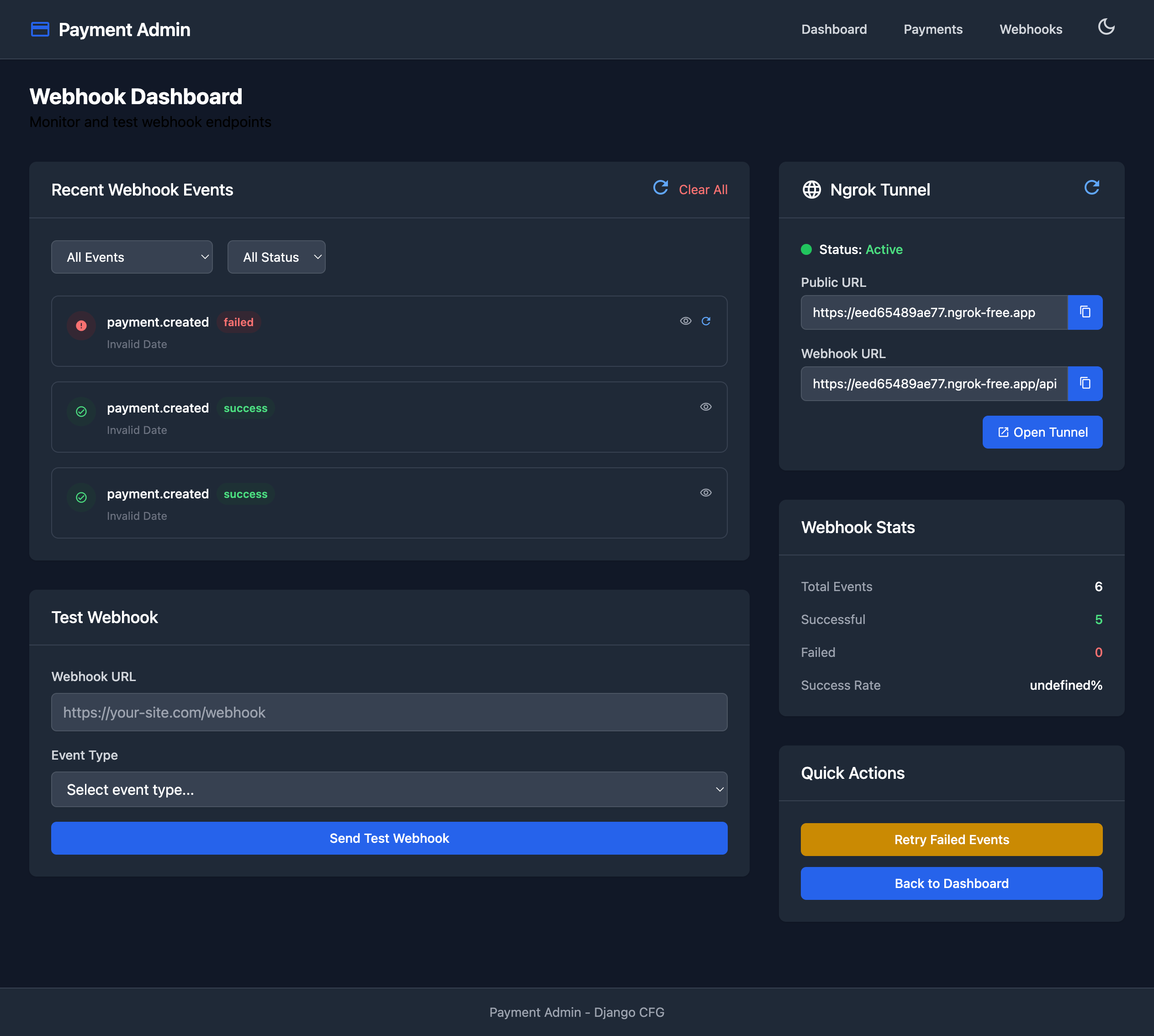
Real-time webhook monitoring with ngrok tunnel status, event filtering, and testing tools.
┌─────────────────────────────────────────────────────────────────────────┐
│ Payment Admin                            Dashboard  Payments  Webhooks  │
├─────────────────────────────────────────────────────────────────────────┤
│                                                                         │
│ Webhook Dashboard                                                       │
│ Monitor and test webhook endpoints                                     │
│                                                                         │
├───────────────────────────────────────┬─────────────────────────────────┤
│ Recent Webhook Events      [Clear All]│ 🌐 Ngrok Tunnel          [🔄]  │
│                                       │                                 │
│ [All Events ▼] [All Status ▼]        │ 🟢 Status: Active               │
│                                       │                                 │
│ ⭕ payment.created     [failed]       │ Public URL                      │
│    Invalid Date            [👁] [🔄] │ https://eed65489ae77...  [📋]  │
│                                       │                                 │
│ ✅ payment.created     [success]      │ Webhook URL                     │
│    Invalid Date            [👁] [🔄] │ https://eed65489ae77...  [📋]  │
│                                       │                                 │
│ ✅ payment.created     [success]      │ [🚀 Open Tunnel]                │
│    Invalid Date            [👁] [🔄] │                                 │
│                                       │─────────────────────────────────│
├───────────────────────────────────────┤ Webhook Stats                   │
│ Test Webhook                          │                                 │
│                                       │ Total Events              6     │
│ Webhook URL                           │ Successful                5     │
│ [https://your-site.com/webhook     ] │ Failed                    0     │
│                                       │ Success Rate       undefined%   │
│ Event Type                            │                                 │
│ [Select event type...              ▼]│─────────────────────────────────│
│                                       │ Quick Actions                   │
│ [Send Test Webhook                  ] │                                 │
│                                       │ [🔁 Retry Failed Events       ] │
└───────────────────────────────────────┤ [🏠 Back to Dashboard         ] │
                                        └─────────────────────────────────┘
Key Features Visible:
- 📋 Event filtering by type and status
- 🟢 Real-time tunnel status indicator
- 📋 One-click URL copying
- 🔄 Individual event retry
- 📊 Live webhook statistics
- 🧪 Built-in webhook testing tool
- 🔁 Bulk retry for failed events
Best Practices
1. Check Panel Before Testing
Always verify ngrok status in panel before testing webhooks:
# ✅ CORRECT - check panel first
# 1. Open http://localhost:8000/admin/payments/webhook/
# 2. Verify "Tunnel Active: Yes"
# 3. Copy webhook URLs
# 4. Configure external services
2. Monitor Webhook Events
Use the events log to debug webhook issues:
# View recent webhook events
# - Check response status
# - View payload details
# - Monitor response times
# - Debug failed webhooks
3. Use Test Feature
Test webhooks before configuring external services:
# ✅ CORRECT - test first
# 1. Click "Test" button in panel
# 2. Verify webhook endpoint responds correctly
# 3. Fix any issues
# 4. Then configure external services
Troubleshooting
Panel Shows "Tunnel Not Active"
# If panel shows tunnel not active:

# 1. Make sure you used runserver_ngrok
python manage.py runserver_ngrok  # NOT runserver!

# 2. Check ngrok configuration
# config.py
ngrok: NgrokConfig = NgrokConfig(
    enabled=True  # Must be True
)

# 3. Verify DEBUG=True
# Ngrok only works in development mode
Webhook URLs Not Displaying
# If webhook URLs not showing:

# 1. Ensure payments app is enabled
enable_payments: bool = True

# 2. Run migrations
python manage.py migrate

# 3. Restart server
python manage.py runserver_ngrok
Next Steps
- Webhook Examples - See integration examples
- Troubleshooting - Common issues and solutions
- Configuration - Advanced ngrok configuration
See Also
- Payments App - Complete payments documentation
- Built-in Apps - All built-in applications